Sunday, October 8, 2023

CAGD 377 Sprint 3

During the third sprint I had less time to work than I would’ve liked, so I focused on getting the most important tasks done: finishing up the upgrade system. I decided that this would be the best thing to focus on first since it’ll be the most relevant to players in the next playtest. In an idle game, upgrades keep the game from slowing to a grinding halt and give players more goals to work towards. They’re a bit like footholds on a rock wall, giving something for the players to reach to and giving them a boost to reach the next goal.


First off was optimization. Like I mentioned in the last blog post, using “upgradeSets” instead of prerequisites was a misstep, so I corrected it, rewriting the code to remove upgrade sets and having my future code use prerequisites instead. It wasn’t too difficult a switch because the verifier hadn’t been implemented yet.


Sprint 2 for me was all about the back-end for upgrades, so all that was left for me to add was the front-end for the player. Basically, getting the GUI ready. I did this with two main scripts. First, I made a generic upgradeButton prefab that instantiates a button with a certain upgrade, displays the appropriate upgrade name and price on the button, and tries to purchase the upgrade when clicked. Next, I made a buttonManager script that checks if the requirements for an upgrade are met whenever the player buys a generator or upgrade (since those are the only things that could cause it to update) and instantiates a button prefab.


Here it is working!


The only trick was making sure upgrades display on the correct spot on the screen. To do this, when the buttons are instantiated they get added to a list, and all elements in the list get lined up on the screen based on their spot in the list. When a button is clicked and the purchase is successful, it gets deleted and removed from the list, which lets all upgrades ahead of it slide back into place nicely.


The only thing left before I could get it working was to input the rest of the data from our spreadsheet into the upgrade library in the game. It was a little tedious, but didn’t take more than half an hour and it got all 21 of our upgrades in the game. The one issue I ran into is that the most expensive upgrade is $9 billion dollars, but for some reason the unity interface wouldn’t let me input more than 8.999999999, which is weird since that isn’t any kind of integer limit. For now, players will probably never be able to tell the difference, and balance wise, 9 billion is basically no different than 8.999999999 billion, but we may want to look into this in the future.


But with that, all 21 base upgrades are in the game! We may want to look into some more later, which would require an expansion of the system, but for now, I’m very happy with it and proud of my work. With this, two of our core features, generators and upgrades, are fully implemented. Now, all that’s left before our game is ready is items.


Upgrades weren’t too much trouble for me since I had a plan, but I don’t have one yet for items and I’ll be working with other people’s code, so it may prove more challenging. It’ll also require more steps and interconnectedness than the previous tasks. However, I’m still confident that we’ll be able to do it.


Saturday, September 23, 2023

CAGD 377 Sprint 2

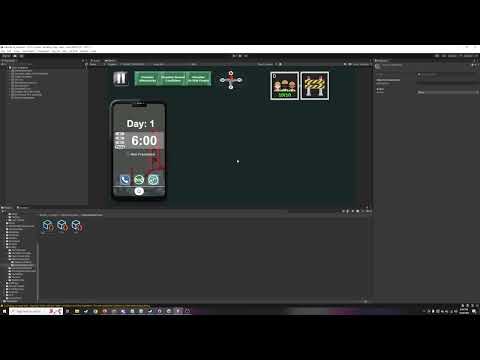
The first challenge this sprint was one of communication: I needed to make a guide for my teammates on how to implement the rest of the generators using the tools I created. Since the hard part was mainly connecting objects together in the Unity editor, I figured communication would be the most straightforward with a video tutorial, lasting only 9 minutes. With this, my teammates could finish the rest of the generators so I could focus on other features.


And for this sprint, that was the upgrades. I programmed the framework for basically the entire upgrade system. Previously my main two ideas were an array of id values to store the data of which upgrades were owned, and a set of upgrade ScriptableObjects that contain all the relevant information for the upgrade objects.

Ultimately I realized that the best solution was to marry these ideas together: the saveData stores an array of integers that are 1 or 0 to mark if an upgrade is owned or unowned, and each upgrade is a scriptable object with one of its datum being an id number that tells the upgradeManager which int in the array corresponds to it. So basically, the upgradeManager reads the saveData, if there’s a 1 at a certain array index, it checks the upgrades for the one with that id number, and turns it on.

One other challenge to note was whether to make the upgrades additive or multiplicative: ie, should a 2x multiplier and then 4x result in 6x, or 8x? With my current system, multiplicative was far easier, so that’s what we decided to go with (also because it gives more power to the player). 


Definitely my biggest misstep with this system was organizing upgrades into “upgrade sets”, since some upgrades come in a linear progression: ie, Tier 1, Tier 2, Tier 3 of a certain upgrade. Doing this ensures that players can’t get the tier 2 upgrade before tier 1, but adds a lot of complexity and noise to the code, since now we’re sorting through an array of arrays.

A better way to have achieved the same goal–which I’ll probably switch to as soon as I can–is for each upgrade to have a “prerequisite id” integer that points to the upgrade that is required as a prerequisite, if one exists.


Making this system was the majority of my work for the sprint, but it’s a super important system, and with it working, that’s two of our big three features done (generators, upgrades, and items). My next challenge is getting the UI for upgrades working, since I’ll need a queue of upgrades available for purchase on the left side of the screen.

I haven’t worked with UI elements as much so this will be more of a challenge for me, but I don’t think it should be too hard, since we’d just need a list of upgrades available for purchase, and once one has its requirements met, it should be added to the list and go to the front of the queue. 

One other change I discussed with the lead was whether we’re sticking with 2D UI or if we want to make 3D buttons. If we eventually go for 3D, that may substantially change how this system would work, so maybe the next step is testing out clickable 3D buttons.

As I see it, the biggest challenge is going to be a concise and readable way for players to see upgrade descriptions–adding a string for them to the upgrade data is easy, but finding a spot for it to display in the ui could be challenging. We can cross that bridge when we get to it though.


Overall working with data engineering (is that an appropriate term? For finding the most efficient way to store and retrieve data) has been a satisfying experience for me.


Sunday, September 10, 2023

CAGD 377 Sprint 1

 I was out of town for the weekend, and with our delayed start for Sprint 1, I really had to hit the ground running. Despite this, I still pulled through and completed all my tasks for the sprint.

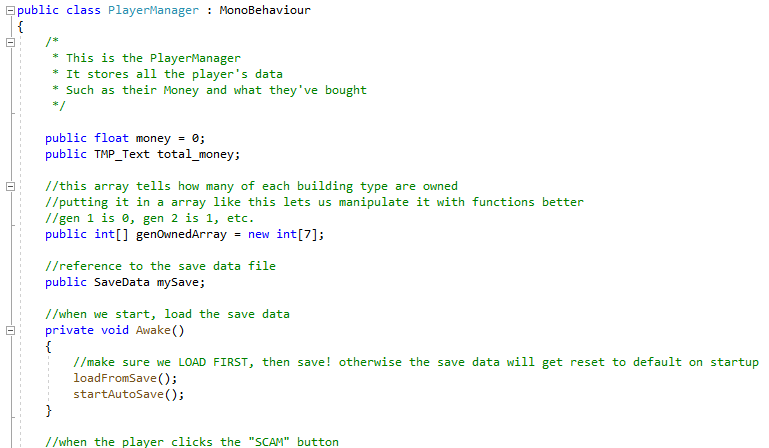
As the main programmer, most of what I did during the sprint was setting up the foundations for how the code will look going forwards. I discussed with our lead and decided that the best way forward would be to split up the main sections of the game into three main scripts: the PlayerManager, the ShopManger, and the GeneratorManager. 

The PlayerManager stores all of the player’s data in one script, so it’s easy to grab it and save it to a scriptable object. The ShopManager deals with purchasing new generators—checking the player has enough money, updating costs, and completing purchases. The GeneratorManager does all the calculations for money generated per second. I figured things could get laggy if this wasn’t standardized, so I made sure to keep it all in one place in a few functions to keep it under control.


To demonstrate their functionality, I got everything set up with the first generator in the game—the Spambots—and hooked it up to the appropriate scripts. As of the first sprint, the Spambots in their base form are already fully functional, and all it takes for the rest of the buildings to be in the game is a few copy+pastes. The basic data for the generators is stored in scriptable objects that get read by the shop and generator managers, so once that data is put in place and the UI is set up, we can already have all the generators in the game.


In my last game development project, I was a lead, so I had to think about how we were going to organize the production of all of the game’s features. This time I’m a programmer, so I’m given the features to create, and instead have to figure out the best way to organize the technical functionality of those features. 

One challenge for me is that most of my programming assignments up to this point were solo, so I could just code and organize it in a way that made sense to me. Of course, having good organization would be helpful and commenting my code to explain it to the graders was relevant, but I was still mostly held to the standard of “does it work?” This time though, I have to worry about my code and organization structure being understandable to the other members of my team. This is especially difficult since we’re making an idle game that’s mostly just a bunch of math—since my last project was a 3D platformer, it was easier to communicate what we were going for with the design. Now we’ve got spreadsheets.


Coming up next is going to be working on upgrades and items, and while I had a good idea of how to easily implement the generators, this might be a bit more of a challenge. I may have to do some research about good ways to implement upgrade and item systems, however I already have some ideas.

For the amount of generators owned, I made an array that abstracts all that data so it can be easily stored in a save file, and then I have a function in the player manager that knows how to read it. I figure that for upgrades I can do something similar, once I know how many should be in the game I can just make an array with a 1 or a 0 in each spot to mark if that upgrade is owned, and then number each upgrade with which spot it is in the list. While it’s an abstract system, it’s not very data intensive, and it can be explained to the other coders with comments.

On the other hand, the reading function for this may be more complicated since it’ll have to check every single number in the array. However, that may just be a product of there being a lot of upgrades—the only other way to do that would probably be a list of what upgrades are owned, and that would require a new scriptable object. However, if a made a scriptableObject “Upgrade” with a name, reference to what it should add to, and a multiplier, that could be more efficient in a list and easier for programmers to read and edit.


Saturday, May 13, 2023

CAGD 370 Postmortem

 Now that the fifth sprint is done and we have a finished build of our game, Figure Skating Flying Squirrel, it’s time to do a postmortem of the whole development process. First, I’ll talk about some challenges we faced during the development process, and then I’ll talk about how the final project turned out (it went great).

One challenge we faced during the start of development was breaking up tasks into sufficiently small pieces. For example, developing a level is a long process. Eventually I decided that the best way to do it would be to make separate cards for two drafts of the annotated map, a level blockout, a first draft, and final draft of each level. Throughout the development process we had some similar issues, but I definitely think this is just something that gets ironed out with experience, since we figured out what the expected steps are for certain tasks.

Another challenge I ran into during the fourth sprint was getting stuck on a card I couldn’t get to work. I looked through the unity scripting API and online for solutions, and nothing seemed to work. Eventually I figured out it was a conflict with someone else’s script—I assumed he would’ve told me if there was a conflict, and he assumed that I would’ve checked for any conflicts. In the end it was a funny misunderstanding, but I think going forward I learned that I should ask for help when I get stuck, and check with my team members if there could be a script conflict.

In the final sprint we realized we probably wouldn’t have time to include a final level, and had to decide to cut it. Throughout the development process, as the lead, I would have to make the call on whether or not to cut certain features. While this is just something that has to happen in every project, since at some point it has to be finished, I didn’t want to dismiss other people’s ideas. I solved this problem by trying to find ways to incorporate other people’s ideas by modifying them—for example, somebody suggested being able to upgrade the player with new abilities. I didn’t think this would work great for the design of the game, so I suggested keeping the idea of new abilities, but putting them in temporary power-ups instead of permanent upgrades. 

An early success of the project was getting the movement and physics working early. I really have to thank my programmer for this; but getting that working early on meant we could work on the levels and game interactions with much more confidence.

A later success was the design of our level objects. I wanted to add some intractable objects to the levels that made things more interesting. The design I’m most proud of are the bumpers—I realized that the biggest challenge to the player is the large turn radius and slow turn speed. I figured that bumpers that instantly cause the player to bounce one-hundred-eighty degrees would therefore be a meaningful addition that players want to go for. 

Another game object that had some thoughtful design was the branch wall. The player can smash through branch walls if they’re going fast enough. I wanted the players to be able to pick up on this, so first I made a model for them that communicates that they can be broken. I made them look really brittle, but I also gave them large gaps that the player can see through. If the player can see that there’s an area behind the wall, they’re more likely to realize that they have to break the wall to get in. For the implementation, I put a section in the tutorial level where the player starts going really fast, and put a branch wall at the end of it. I correctly reasoned that players would likely lose control and hit the wall, then realizing that they can smash right through.

One of the biggest successes of the project was the switch to ProBuilder for our level building. For our game especially, we needed a lot of slopes, ramps, and curves, which weren’t feasible with the unity primitives. Using the ProBuilder plugin, we were able to make levels that both played and looked way better.

What would I do differently on my next project? While we knew we wanted powerups and level objects, I think getting design documents for those sooner would’ve been beneficial. Additionally, I think more of a design document for how levels should be designed would be good—while we got things worked out, I think it was hard for me to communicate my vision for the level design until I made the tutorial level; making a design document with some general guidelines would’ve made that easier. I also would’ve liked to get the third level in if we had more time.

Overall, I’m really happy with how the project turned out. I think our strong core mechanics greatly contributed to a game that’s cohesively fun, and the powerups and level objects provide nice spins on the gameplay. The high score time and acorns give players some great incentives to go for, and playing it, it really feels fun to try to speed through the levels as fast as possible. The moveset combined with the varied levels means there’s a lot of tricks the player can pull off, and it makes the gameplay feel fun, rewarding, and flexible. 


Sunday, April 30, 2023

CAGD 370 Blogpost 4

During the fourth sprint I got to work on building the tutorial level and coding the menus, while our programmer finished off the remaining features and our level designer got to work on the second level. The major features of the game really came together during this sprint, and all that we need for the game to be ready will be development of the later levels. Some smaller additions I made were the models for the checkpoint flags, snow shoes, and air rings, as well as adding a controls screen.

The pause menu gave me some trouble. Coding it in didn’t take too long, but for some reason the buttons wouldn’t respond to the mouse, and I couldn’t figure out why. I spent a lot of time looking up solutions and couldn’t find anything, and after systematically combing through the scene found that it had something to do with the camera. Eventually I discovered that there was a conflict with another script that disabled the mouse input, so after making the pause menu re-enable it, everything was good to go. Having a working pause menu and being able to easily navigate between the scenes and main menu felt like we had a real working game.

For the rest of the sprint I worked on the tutorial level. I built the whole thing from the ground up, completing the annotated map, blockout, and full working version of the level. Our programmer added in some code using surface normals to get the movement working on any surface, so I wanted to try something different for the tutorial level. Since we used ProBuilder in CAGD 270 to make levels, I thought it’d be worth experimenting with using it for this project. After testing it out with our movement system, ProBuilder worked great, and let me make much more intricate levels with curves and ramps that fit our game perfectly. 

After testing the level out myself, I made a few changes from the annotated map. Mainly, I removed the alternate routes in the opening area, since I think they would be too confusing for new players. I want it to be clear where to go next, and the current more linear design better shows the player what their goal is: gliding to the platform that’ll let them access the next section. This ensures that players learn to skate and glide before they continue. I added a few extra ramps, but they all direct the player to the goal. One of the extra ramps subtly pushes the players towards success, since if they skate up it to get the acorn, they’ll come down with extra speed that makes the first gliding section easier.

After the first checkpoint, there’s a long ramp and jump to prepare players for more of what the main levels are like, with long speedy down-ramps. This big jump can’t be completed by gliding right away, so players have to learn to start gliding at the apex of their jump. During the playtest we saw some players struggle at this section, but because there’s a checkpoint at the top, players were able to try until they got it without losing progress. I was happy that it successfully taught the players how to play the game. 

The last trick I added was the first breakable wall. Because players completing the jump have a lot of speed, it’s likely to be hard for them to slow down. I added a breakable wall at the end of this section so that players will crash into it and learn that these walls can be broken. In the playtest, I saw a lot of the design elements work perfectly, and all players were able to complete the level while learning how to play.


Wednesday, April 12, 2023

CAGD 370 Blogpost 3

 The third sprint was defined by our kinesthetic playtest, where we had other groups playtest the movement of our game in the first level. We learned some important things from the playtest. Skating worked really well, but gliding not so much. Because players were used to holding W to go forwards, as soon as they started gliding, they would nosedive. We decided to remove the S and W gliding controls for now because their gameplay use was limited and they felt confusing and unintuitive to players. The other major change to movement was that now gliding is limited to a timer, so players can’t glide over the full level.

During the sprint, the first thing I did was upload my model for the end of level flag. Now that the level flag was coded in, I could link all the levels up to the main menu. The main menu has buttons for each level so that the player can access whichever they want in any order. Next I started on the main menu stats. I got a scriptable object set up for the player data, which updates whenever the player completes a level. That way, the player’s time and acorns are recorded, and then compared to the record time / score, and then the menu can display the record time and score. With the acorns, this incentivizes players to try to collect them all, and with the time, it encourages players to compete to go as fast as possible.

Another major development I tried to get completed as soon as possible was making a design document for level objects. We decided that the next feature to add was intractable objects in the levels, so I designed the bumper, branch walls, black ice, and icicles. I wanted an object that changes the players movement, and eventually realized that the bumper would be huge for gameplay because it lets players easily 180, which is difficult with the skating controls. The branch walls are a simple barrier that players can break if they’re going fast enough, which serves as a different type of obstacle. Black ice is another unique obstacle type, as its much more slippery. Finally, icicles add another hazard in the air.


Finally, I decided to take on designing the tutorial level. Since the movement is the most important part, I wanted to design a gentle area that lets players get used to how movement feels. It opens on a frozen lake with a small ramp, an acorn, a wall barrier, and a small puddle of water, where players can get acquainted with the controls. From there there’s two different paths with a tiny gliding platforming section, rewarding some extra acorns and both leading to the first checkpoint. After the checkpoint is the first challenge, a short skate down a steep hill to prepare players for what the harder levels will be like. Its a straight shot with one gliding gap and one big turn. In the final area, players can experiment with a branch wall, avoid another water hazard, and learn to use a jump pack to reach the flag.

Overall I would consider the design mostly successful, but I feel like I could do better with more time. However, as the third sprint comes to an end, I know it’s important that the project gets completed by the deadline. I’ve started work on the blockout with proBuilder, and next up is to finish the tutorial level.


Sunday, April 2, 2023

CAGD 370 Blogpost 2

Our team finished the second sprint, we have a lot of good progress but still have a ways to go before the prototype is complete. The good news is that all of the foundational elements are there and everything in the game works—at this point, we know that no matter what, we’ll have a functional playable prototype. Elements like skating, gliding, acorns, and the first level are all in the game. The next step is going to be looking at the game’s completeness, making sure there’s a good amount of other features. 

During this sprint, I made design documents for the HUD and power-ups, so that my team can have a good idea of what we’re going to be designing. I also coded in the acorns, and gave them a model. The acorn collection is a dynamic system that counts how many acorns are in the level at the game’s start, so this way, the designers can add more acorns to the level without worrying about breaking the HUD. I also wanted the acorns to look nicer than just deleting on touch, so now they quickly shrink and move towards the player, to indicate picking up.

Hand in hand with collectibles, I also set up the rest of the HUD, which included the speedometer and the timer. For the speedometer, I grabbed the rigidbody of the player and used its velocity, then rounded it. For the timer, I tried a formula to round it to two decimal places, but then it would jitter back and forth since it would truncate whenever there was a trailing 0. Fortunately I found a truncation function in the ToString() method, and set it to always only display two decimal places. I also made a model for the jump pack power-up that our programmer implemented. I know that art should be minimized, but there’s going to be at least three power-ups, so I think it’s useful to the player to have a way to distinguish between them. The model is also pretty simple.

We faced a couple of challenges during the sprint, the first was that kickoff was a little trickier since we didn’t have class time to do it. We distributed some work out over the weekend, but reviewed it and modified it slightly in person, where it was easier to discuss. When it came to our cards, we were better about splitting things down from the start, however, this led to some redundant cards.

Another challenge was that our level designer was out sick for a few days towards the end of the sprint, but fortunately he pulled through and got a blockout of the first level completed. While we had six cards left at the end of the sprint, we completed over twenty. The work we didn’t get to was the level flag, the dash powerup, and the second level map.

Going forwards, the next area of focus is going to be adding intractable objects to the levels beyond the existing collectibles and hazards. Once they are designed, the programmer can implement them, and the level designer can put them in the levels. We also need a system to load into levels from the main menu, as well as tracking stats, and saving player data. Currently, there’s also a few more power-ups to be coded in. When those features are done, the levels can be completed, and the game will be ready!


Featured Post

Aftershock Simulator Sprint 3

This is th e tutorial video I made for my team demonstrating how to use the objective system I designed this sprint. I’m really happy with h...